£33
Your phone can already shoot video and pictures that look professional. Learn the light, the framing and the edit. Feel confident behind the camera and always know what to shoot. 23 chapters. Eight working tools.
WHY UNLOCKED
Most people are carrying a camera that can shoot professional-quality video and pictures, and using it on autopilot. Point, tap, hope. Then they compare the result with someone else’s feed and decide they need better gear.
They do not. What is missing is the light, the framing and the edit, and a plan for what to shoot before they need to post.
Without that, every post starts from zero. You are trying to think of the idea, find the light, film the clips, edit everything and write the caption in one sitting, and it rarely looks the way you pictured it. So you post less, or you stop.
That is not a talent problem. It is a skills and planning problem, and both can be learned.
UNLOCKED teaches both.
You learn to set your phone up properly, read the light, frame the shot and capture one moment five ways. You edit on the phone, with a clear workflow for video and Lightroom Mobile for pictures. And you go in with a plan: what to capture, which format it is for and where it goes afterwards, so you are never staring at an empty camera roll.
The result is content that looks professional, made on the phone already in your hand, by someone who is confident using it.
Not a course. Not a list of hooks to copy. 23 chapters and eight working tools, built to be used while you shoot.
WHY IT MATTERS
One ceramicist, two Sundays, and the one thing she changed in between.
The first Sunday, at 9pm, she opens her camera roll to find something for the week. 412 items. One shot, repeated. Nothing saved that she can actually use, so she starts from zero.
Nothing wrong with the phone. Nothing wrong with her work either. She just had no plan.
The next Sunday she opens her content bank instead. Four process clips for a Reel. One useful idea for a carousel. One detail and a question for a story. Eleven minutes of filming, captured during the week. Three posts ready.
That second week is not more talent or better gear. It is the same phone, used with a plan.
That plan is what UNLOCKED gives you.

WHAT CHANGES
Instead of starting from an empty camera roll.
You open a content bank that is already sorted into ready, to edit and published.
FIVE STAGES. ONE SYSTEM.
Chapters 00 to 04 get you and your phone ready. Everything below builds on that.

After that, you publish without starting over. That part is ongoing, and it is the point.
WHAT YOU GET
The full guide.
230+ pages and 23 chapters, built to be read, searched and returned to while you are actually creating. No hours of video to sit through first.
Eight working tools.
Shot Library, Reel Storyboard and Content Bank, plus a Shoot Tracker, a Phone Shoot Checklist, B-Roll Recipe Cards, a Carousel Builder and a Phone Shoot Rescue Guide. Tools you fill in as you go, not worksheets.
Your phone, set up in one sitting.
Chapter 03 covers lenses, storage, quick camera access, quality settings, grid and level, so the camera is ready the moment there is something worth shooting.
Two editing chapters.
A mobile video workflow for your clips, and Lightroom Mobile for your pictures, one small decision at a time.
Content Frameworks.
Ready-made structures to plan, capture, shape and organise content, for the days you would rather not start from a blank page.
The Creator Tasks Hub.
Every practical task in the guide in one place, for when you want the next step without rereading everything.
The Bonus Vault.
Extra prompts, checks and reminders to use before you film, edit or publish.
Updates included.
Instant access. It is yours to keep, and updates come with it.

£33
Start with the phone in your hand.
Instant access · 230+ pages · 8 working tools · Yours to keep
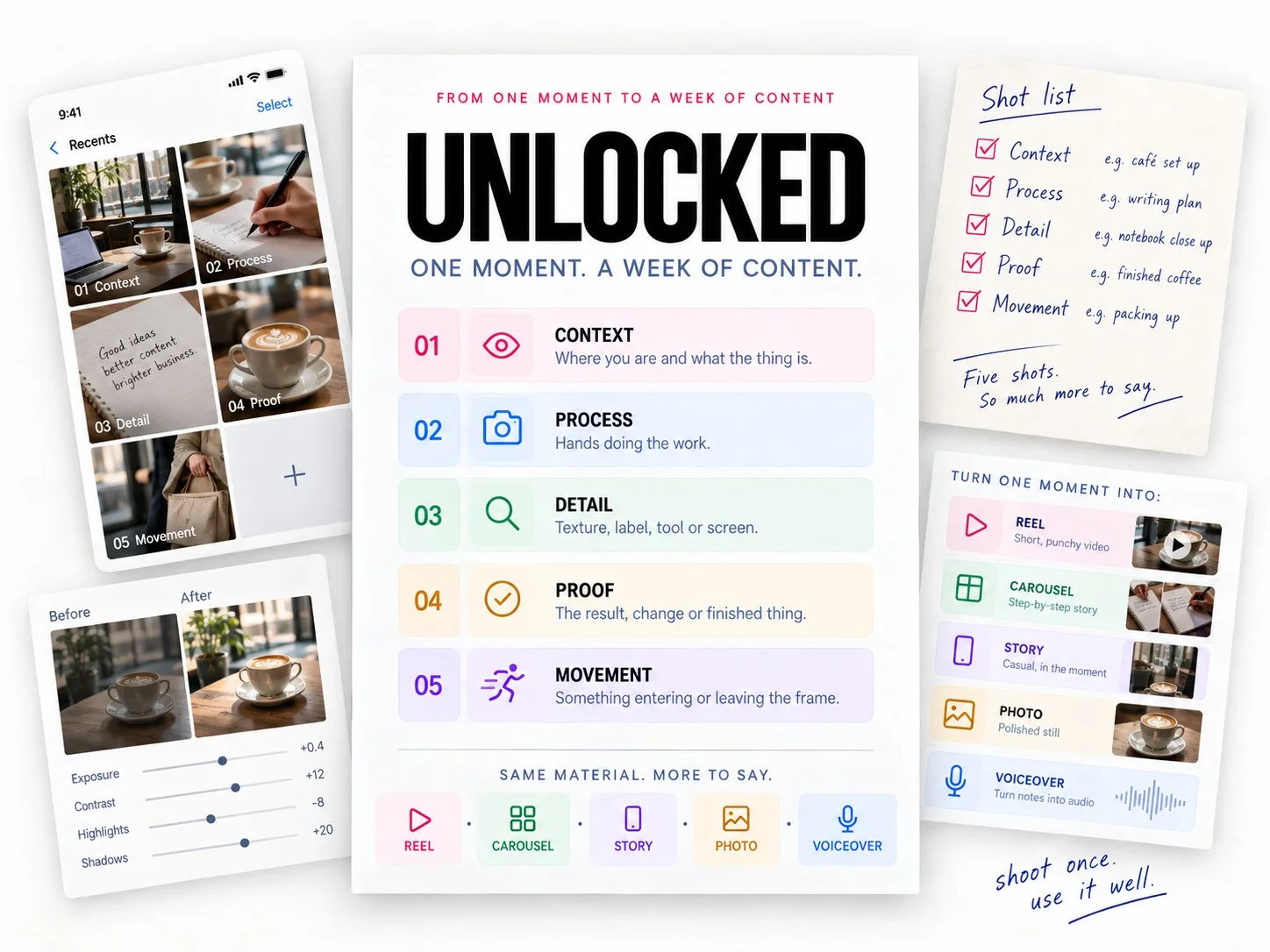
WHAT TO SHOOT
One moment becomes far more useful when you capture it five ways.
Shoot all five and one moment gives you a Reel, a carousel, a story, a photo and a voiceover. Shoot once, use it well.
PROOF
Light, framing, timing and the edit are the same skills whatever you are holding. Chapters 17 and 18 walk through the edit on a phone, one small decision at a time.
WHAT IS INSIDE
Get ready. Learn to see it. Shoot it. Edit it. Keep it. Open any chapter below to see exactly what it covers.
00 // Welcome to UNLOCKED
01 // The Way Through
02 // Creator Mindset
03 // Start Strong: Set Up Your Phone
04 // Simple Gear That Helps
05 // What Counts As Content
06 // Find Ideas Without Copying the Feed
07 // Train Your Eye to Notice Content
08 // The Phone Content Buckets
09 // Create Your First B-Roll Reel
10 // Make the Reel Feel Better
11 // Shoot Stronger Photos That Work for Content
12 // Create a Carousel From One Idea
13 // Create a Voiceover Reel
14 // Create a Talking-Head Video
15 // Turn One Moment Into Five Posts
16 // Shoot for the Format
17 // Edit Video on Your Phone
18 // Edit Photos in Lightroom Mobile
19 // Build Your Content Bank System
20 // Creator Tasks Hub
21 // Content Frameworks
22 // Bonus Vault
UNLOCKED is for you if:
YOU DON’T KNOW WHAT TO SHOOT
You know your phone can make great content, but you don’t always know what to shoot. Your camera roll is full, but when it’s time to post, somehow none of it feels useful.
IDEAS DON’T BECOME CONTENT
You save ideas constantly but don’t have a reliable way to turn them into something. You want Reels, carousels, images, voiceovers and videos to stop feeling like completely separate skills.
YOU WANT A SYSTEM YOU CAN RETURN TO
You want your content to look professional without turning every post into a full production. You want to get better at editing what you shoot, stop waiting for better gear, better locations or the perfect idea, and build a system you can actually return to.
IT IS PROBABLY NOT FOR YOU IF
You want a done-for-you content calendar, a list of hooks to copy, or a strategy for going viral. UNLOCKED teaches you to shoot and build your own material. That is slower than copying, and it is the only version that keeps working.
WHO MADE THIS
I’m a photographer and videographer in London, and I have spent years working out how ordinary clips and single pictures turn into something worth sharing.
UNLOCKED is the system I use. Not a theory I put together for a product. It is the actual way I shoot, bank and build content for my own work, written down properly so someone else can run it.
Most of what is in it comes from realising that the constraint was almost never the camera. It was knowing what to do with it, and having a plan before I needed to post.
BEFORE YOU BUY
Is this a course?
Do I need a particular phone?
Do I need to be good at editing?
Is this only for people who want to be creators?
What do I get, and when?
£33
Start before you need to post.
230+ pages. 23 chapters. Eight tools you fill in as you go. One system for noticing, shooting, editing and keeping content from the phone already in your hand.
Instant access · Yours to keep, updates included